

This is Part 4 of the JavaScript Coding Tips series. This time, the topic is asynchronous concurrency control.
If you missed the previous parts:
Part 1: 10 Modern JavaScript Tricks That Cut Boilerplate
Part 2: 20 Modern JavaScript Tricks for Cleaner Everyday Code
Part 3: 10 Debounce and Throttle Patterns Every JS Developer Should Know
Concurrency is one of those things that looks straightforward in small examples. You have several requests, put them into Promise.all(), await the result, and move on.
Then one request fails. Or you suddenly have 500 requests instead of five. Or a timeout rejects while the original request keeps running. This is usually where the simple version stops being simple.
Here are ten cases worth knowing.
1. One Promise.all Rejection Rejects the Whole Result
A common example is uploading several files at once:
const results = await Promise.all(
  files.map(upload)
);
This works until one upload rejects.
try {
  const results = await Promise.all(
    files.map(upload)
  );
} catch (error) {
  console.error("Upload failed", error);
}
As soon as one promise rejects, the promise returned by Promise.all() rejects too.
There is a small but important detail here: the other operations are not cancelled. Some files may already be uploaded, while others may still be in progress.
For a batch operation where partial success is acceptable, Promise.allSettled() is usually more useful:
const results = await Promise.allSettled(
  files.map(upload)
);

const successful = results
  .filter(result => result.status === "fulfilled")
  .map(result => result.value);

const failed = results
  .filter(result => result.status === "rejected")
  .map(result => result.reason);
The downside is that allSettled() doesn’t throw just because one operation failed. You have to inspect the results yourself.
For batch uploads, imports, notifications, or other independent jobs, that’s often exactly what you need.
For a group of operations that must all succeed together, I’d stick with Promise.all().
2. Promise.race Is Useful for Timeouts, With One Catch
A common timeout implementation uses Promise.race():
function fetchWithTimeout(url, ms = 5000) {
  return Promise.race([
    fetch(url),

    new Promise((_, reject) => {
      setTimeout(() => {
        reject(new Error("Request timed out"));
      }, ms);
    })
  ]);
}
Whichever promise settles first determines the result.
If fetch() finishes first, you get its response. If the timer wins, the function rejects with a timeout error.
The catch is that the original request doesn’t stop.
You stopped waiting for it, but fetch() may still be running.
This distinction isn’t important in every situation, but it becomes noticeable when requests are expensive or when the function is called frequently.
If you need to actually abort fetch(), use AbortController. We’ll get to that in tip 9.
3. Promise.any Gives You the First Successful Result
Promise.race() cares about the first promise to settle.
Promise.any() cares about the first one to succeed.
For example:
const result = await Promise.any([
  fetchFromCDN1(),
  fetchFromCDN2(),
  fetchFromCDN3()
]);
If CDN 1 fails quickly but CDN 2 succeeds a moment later, you still get the result from CDN 2.
That makes Promise.any() handy when several sources can provide equivalent data and you only need one working response.
There is one case to remember. If every promise rejects, Promise.any() throws an AggregateError.
try {
  const result = await Promise.any([
    fetchFromCDN1(),
    fetchFromCDN2(),
    fetchFromCDN3()
  ]);

  return result;
} catch (error) {
  if (error instanceof AggregateError) {
    console.error(
      "All sources failed",
      error.errors
    );
  }

  throw error;
}
The individual errors are available through error.errors.
Also, just like with Promise.race(), the other operations don’t automatically disappear when one succeeds.
4. forEach Does Not Wait for async Callbacks
This one still catches people because the code looks completely reasonable:
files.forEach(async file => {
  await upload(file);
});

console.log("Upload complete");
The message is printed before the uploads finish.
forEach() calls the callback, but it doesn’t do anything with the promise returned by an async function.
If the uploads should happen one after another, use for...of:
for (const file of files) {
  await upload(file);
}

console.log("Upload complete");
If they can run in parallel, collect the promises:
await Promise.all(
  files.map(upload)
);

console.log("Upload complete");
So the rule I use here is fairly simple.
For sequential work:
for (const item of items) {
  await process(item);
}
For parallel work:
await Promise.all(
  items.map(process)
);
I avoid forEach(async () => {}) when later code depends on those operations being finished.
5. Serial and Parallel Code Can Have Very Different Costs
Suppose we have ten independent requests and each takes roughly one second.
This runs them sequentially:
for (const id of ids) {
  await fetchUser(id);
}
In the worst case, you’re waiting roughly ten times.
Now compare it with:
const users = await Promise.all(
  ids.map(fetchUser)
);
All requests can make progress concurrently, so the total time can be much closer to the slowest individual request.
That’s a big difference, but it doesn’t mean more parallelism is always better.
This becomes questionable:
await Promise.all(
  thousandsOfIds.map(fetchUser)
);
At that point, your own code isn’t the only thing involved. There are network constraints, API limits, server resources, database connection pools, memory, and possibly another service behind your server.
For ten requests, full parallelism may be perfectly fine.
For ten thousand, I want a concurrency limit.
6. A Small Concurrency Pool
Sometimes serial execution is too slow, but full parallel execution is too aggressive.
A pool sits between the two.
Suppose we want at most three tasks running at the same time:
async function pool(tasks, limit = 3) {
  const results = [];
  const executing = new Set();

  for (const task of tasks) {
    const promise = Promise
      .resolve()
      .then(() => task());

    results.push(promise);
    executing.add(promise);

    const cleanup = () => {
      executing.delete(promise);
    };

    promise.then(cleanup, cleanup);

    if (executing.size >= limit) {
      await Promise.race(executing);
    }
  }

  return Promise.all(results);
}
Usage:
const tasks = urls.map(
  url => () => fetch(url)
);

const responses = await pool(
  tasks,
  3
);
Now no more than three tasks should be active at once.
This is useful for large groups of API calls, image processing, file operations, or anything else where unrestricted concurrency can become expensive.
I still wouldn’t rush to maintain a homemade pool in a production project if concurrency is important to the application. There are established libraries for this, and the edge cases grow quickly once cancellation, priorities, retries, or dynamic limits enter the picture.
But writing the basic version once is useful. It makes the idea behind a concurrency limiter much easier to understand.
7. One Error in a Sequential Loop Stops the Rest
Take this loop:
for (const file of files) {
  await upload(file);
}
If the second upload throws, execution leaves the loop.
The remaining files aren’t uploaded.
Sometimes that’s the intended behavior. If later operations depend on earlier ones, stopping is probably safer.
For independent uploads, you may want to handle each error separately:
const successful = [];
const failed = [];

for (const file of files) {
  try {
    const result = await upload(file);

    successful.push({
      file,
      result
    });
  } catch (error) {
    failed.push({
      file,
      error
    });
  }
}
Now a broken upload doesn’t prevent the next file from being attempted.
This isn’t really a JavaScript question. It’s a business logic question.
Should the operation be considered successful only when every item succeeds, or are partial results acceptable?
It’s worth answering that before deciding how to structure the promises.
8. Retry with Exponential Backoff
Some errors are temporary.
A server might be overloaded for a moment, an API may return 429, or a connection may fail once and work perfectly on the next attempt.
Retrying can help, but repeatedly retrying immediately isn’t a great strategy.
A simple exponential backoff looks like this:
const sleep = ms =>
  new Promise(resolve => {
    setTimeout(resolve, ms);
  });

async function retry(
  fn,
  retries = 3,
  baseDelay = 100
) {
  for (let attempt = 0; attempt < retries; attempt++) {
    try {
      return await fn();
    } catch (error) {
      const isLastAttempt =
        attempt === retries - 1;

      if (isLastAttempt) {
        throw error;
      }

      const backoff =
        baseDelay * 2 ** attempt;

      const jitter =
        Math.random() * 100;

      await sleep(
        backoff + jitter
      );
    }
  }
}
The waiting time grows:
100ms
200ms
400ms
with a small random delay added.
That randomness helps prevent many clients from retrying at exactly the same moment.
The dangerous part is retrying an operation that isn’t safe to repeat.
Imagine this request:
POST /ordersThe client times out, but the server actually created the order.
If you send the request again, you may create a duplicate.
For APIs that support idempotency keys, use one:
const key = crypto.randomUUID();

await fetch("/api/orders", {
  method: "POST",

  headers: {
    "Content-Type": "application/json",
    "Idempotency-Key": key
  },

  body: JSON.stringify(order)
});
The server needs to support that behavior too. The header alone doesn’t make a request idempotent.
Also, don’t retry every error. Retrying a malformed 400 request three times usually just sends the same bad request three times.
9. Abort fetch with AbortController
Now back to the timeout from tip 2.
Instead of racing fetch() against a timer and leaving the request running, connect the timer to an AbortController:
async function fetchWithTimeout(
  url,
  ms = 5000
) {
  const controller =
    new AbortController();

  const timer = setTimeout(
    () => controller.abort(),
    ms
  );

  try {
    return await fetch(url, {
      signal: controller.signal
    });
  } finally {
    clearTimeout(timer);
  }
}
Then:
try {
  const response = await fetchWithTimeout(
    "/api/data",
    5000
  );

  const data = await response.json();
} catch (error) {
  if (error.name === "AbortError") {
    console.log("Request cancelled");
  } else {
    throw error;
  }
}
This actually tells fetch() that the client no longer wants the request.
There is still an important limitation.
Aborting the client request doesn’t undo work the server has already performed.
If a write request reached the server before you aborted it, the server may have changed data even though your client never received the response.
Cancellation is not rollback.
10. Parallel, Serial, or Pooled?
Most of the examples above eventually come back to three choices.
Run everything in parallel:
const results = await Promise.all(
  tasks.map(task => task())
);
This is simple and fast when the task list is reasonably small and the operations are independent.
Run everything sequentially:
const results = [];

for (const task of tasks) {
  results.push(
    await task()
  );
}
This is slower, but useful when order matters or one operation depends on the previous one.
Or limit concurrency:
const results = await pool(
  tasks,
  4
);
This is the middle ground I reach for when the task count can grow and I don’t want to throw everything at the service at once.
There’s no single best version.
For five independent requests, I’d probably use Promise.all() without thinking much about it.
For 5,000 requests, I wouldn’t.
For a sequence of dependent operations, I’d use a loop even if parallel code looks more impressive.
And for a batch where individual failures are acceptable, I’d make sure one rejected promise doesn’t hide everything that worked.
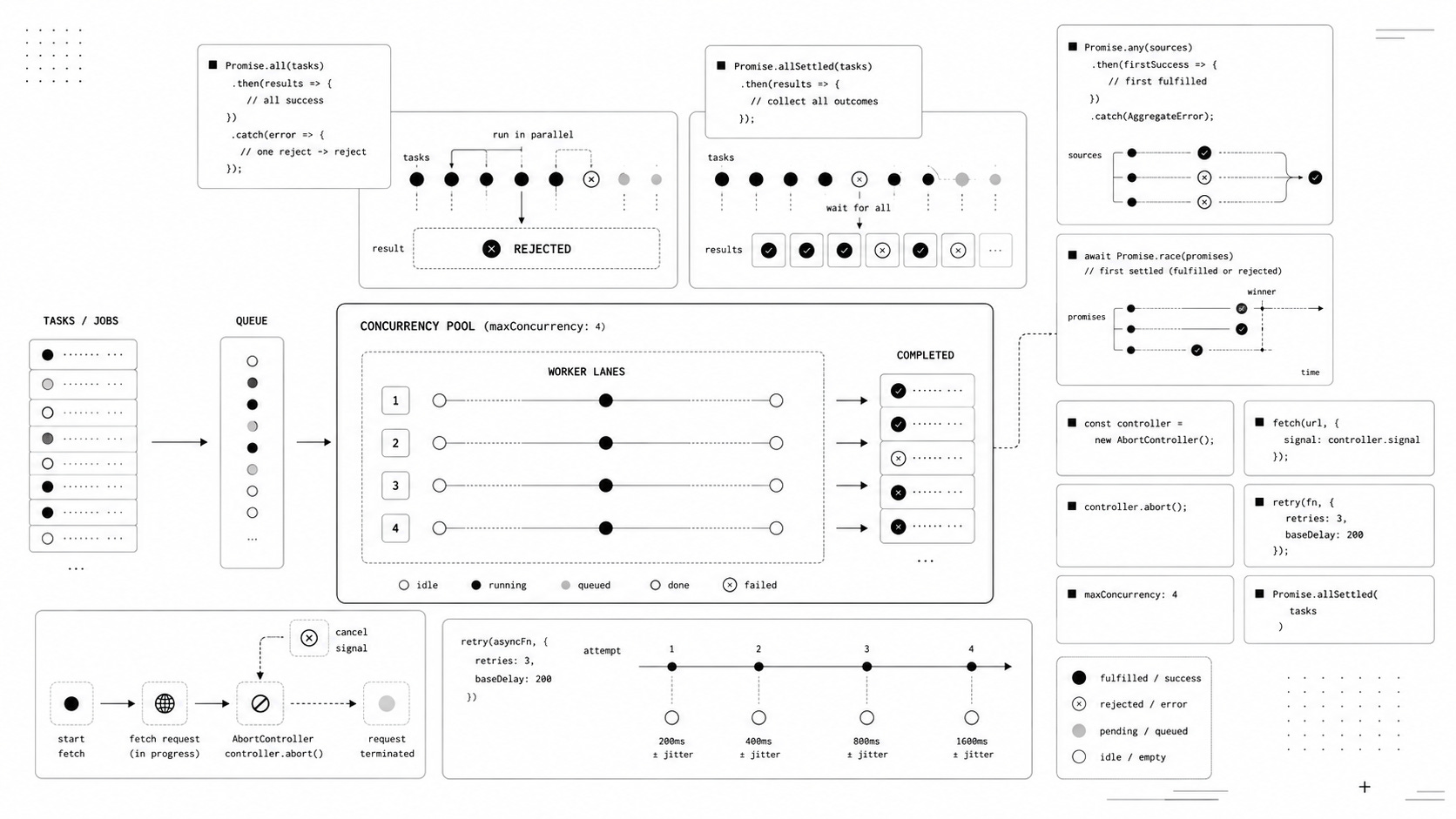
A Short Promise Cheat Sheet
The four Promise combinators are easier to remember when you look at what each one is waiting for.
Promise.all(promises);Wait for all to succeed. Reject if one rejects.
Promise.allSettled(promises);Wait for everything, including failures.
Promise.any(promises);Return the first successful result. Reject only if everything rejects.
Promise.race(promises);Return the first settled result, whether it succeeds or fails.
One thing they all have in common is just as important: none of them gives you a concurrency limit.
If you create 1,000 promises before passing them to one of these methods, the Promise method doesn’t turn that into a four-worker queue.
That’s a separate problem.
Final Thought
The biggest mistake with asynchronous code is probably treating concurrency as a choice between “use await“ and “use Promise.all().”
There are more questions hiding underneath.
Can part of the batch fail? Does order matter? Is it safe to retry? Can the work be cancelled? How many operations should run at once?
For small tasks, the simplest Promise API is usually enough. Once the amount of work grows, controlling how that work runs becomes more important than saving a few lines of code.
That’s when a boring loop, a concurrency limit, or an explicit error policy starts looking much better than one enormous Promise.all().