
10 Debounce and Throttle Patterns Every JS Developer Should Know
Practical timing patterns for search, React, async requests, and browser performance

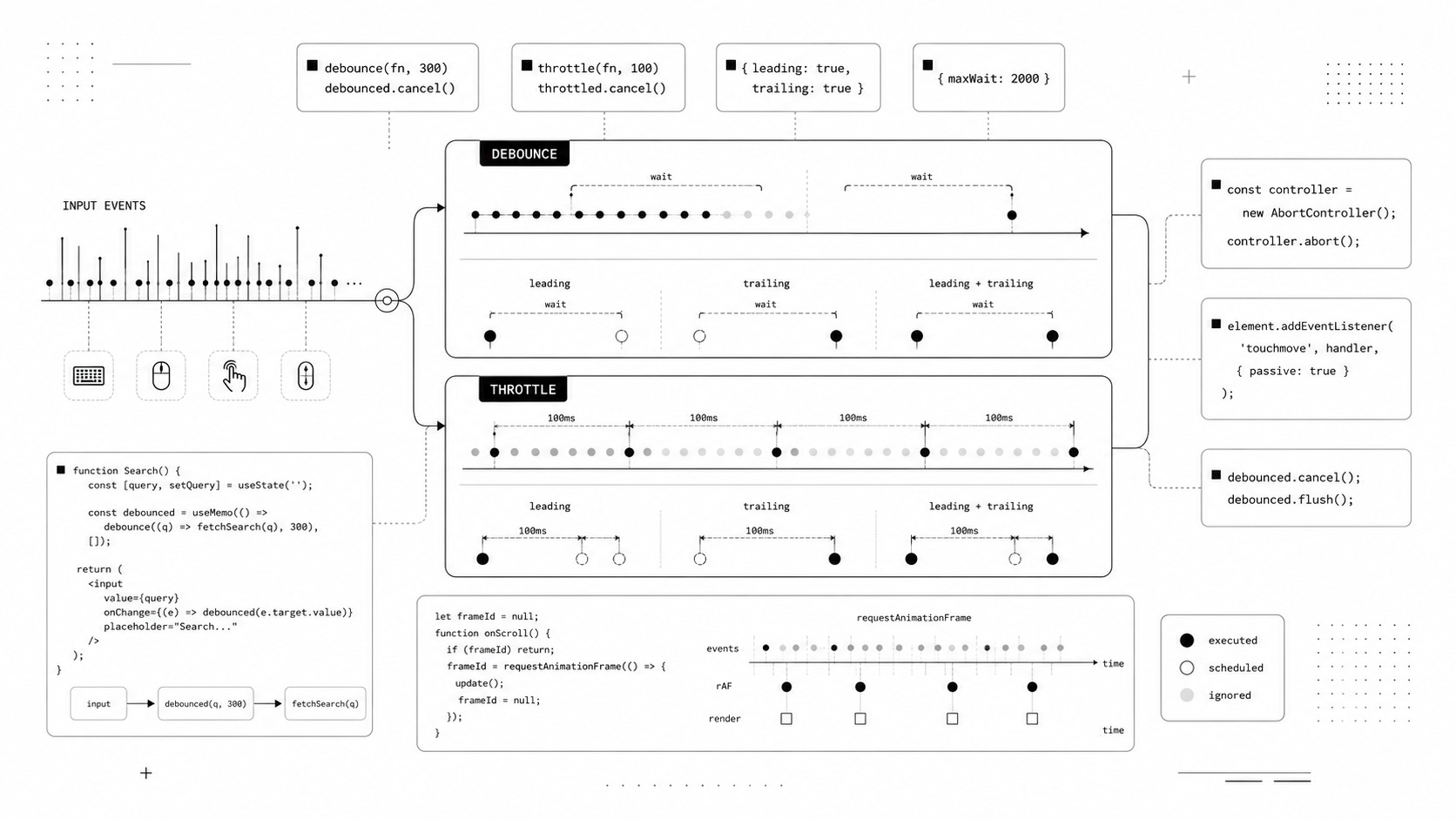
Debouncing and throttling look simple until you need them in production.
Both techniques are usually introduced with a tiny utility function and a search input. Then real requirements appear: immediate execution, trailing calls, cancellation, maxWait, asynchronous requests, React cleanup, scroll performance, and browser rendering.
This is Part 3 of my Modern JavaScript Tricks series.
If you are joining here, start with 10 Modern JavaScript Tricks That Cut Boilerplate, then continue with 20 Modern JavaScript Tricks for Cleaner Everyday Code.
This time, we are focusing entirely on debounce and throttle, including the details that basic examples usually leave out.
More importantly, we will look at where the obvious implementations fail and how to make them safer for real applications.
Debounce vs. Throttle
Before writing any code, it helps to separate the two concepts.
Debounce waits until calls stop arriving for a specified amount of time. If a user types ten characters quickly, a debounced search might execute only once after typing stops.
Throttle limits how frequently a function can execute. If an event fires hundreds of times per second, a throttled handler might run once every 100 milliseconds.
A useful mental model is:
Debounce: wait until things become quiet.

Throttle: keep running, but limit the frequency.
Neither technique is universally better. They solve different problems, and choosing the wrong one can make an interface feel slow or cause important updates to disappear.
Let’s build them from the simplest implementations to patterns that are actually useful in production.
1. Basic Debounce for Search
Search inputs are the classic debounce example.
The naive implementation sends a request for every input event:
input.addEventListener("input", event => {
  const query = event.target.value;

  fetch(
    `/api/search?q=${encodeURIComponent(query)}`
  );
});
Typing frontend can trigger several requests while the user is still entering the word.
Most of those responses become obsolete almost immediately.
A basic debounce delays execution until calls stop arriving:
function debounce(fn, wait) {
  let timeoutId;

  return function (...args) {
    clearTimeout(timeoutId);

    timeoutId = setTimeout(() => {
      fn.apply(this, args);
    }, wait);
  };
}
Now we can wrap the search function:
const search = debounce(query => {
  return fetch(
    `/api/search?q=${encodeURIComponent(query)}`
  );
}, 300);

input.addEventListener("input", event => {
  search(event.target.value);
});
Every new call resets the timer. If another character arrives within 300 milliseconds, the previous scheduled execution is discarded.
Only after the input becomes quiet does search() execute.
The pitfall
Debouncing introduces latency by design.
That makes it useful for autocomplete requests, validation, filtering, autosave, and expensive calculations. It can feel wrong for interactions where users expect immediate feedback.
A 300ms delay is not automatically a good default either. The right value depends on the interaction, the cost of the operation, and how quickly the UI needs to respond.
2. Basic Throttle for Frequent Events
Now consider an event that should continue producing updates, just not on every invocation.
A basic throttle can use timestamps:
function throttle(fn, wait) {
  let lastExecution = 0;

  return function (...args) {
    const now = Date.now();

    if (now - lastExecution < wait) {
      return;
    }

    lastExecution = now;

    return fn.apply(this, args);
  };
}
Use it like this:
const handleMove = throttle(event => {
  console.log(
    event.clientX,
    event.clientY
  );
}, 100);

window.addEventListener(
  "pointermove",
  handleMove
);
The browser may produce pointer events constantly, but our callback executes at most once every 100 milliseconds.
This version uses what is commonly called leading execution. The first eligible call runs immediately.
The pitfall
Calls that happen during the waiting period are simply discarded.
Imagine this sequence:
0ms     call A -> runs
40ms    call B -> ignored
80ms    call C -> ignored
100ms   no call
The latest state represented by call C is never processed.
Sometimes that is exactly what you want. In other situations, losing the latest event produces stale visual state or incomplete calculations.
That is where trailing execution becomes useful.
3. Leading and Trailing Execution
Debounce and throttle become much more flexible once you understand two options:
leading
trailing
A leading call executes at the beginning of a burst.
A trailing call executes after the burst ends.
Conceptually, a debounced function could behave like this:
Events:
A -- B -- C -------- D -- E

Trailing:
        C                 E

Leading:
A                 D

Leading + trailing:
A       C         D       E
A search box usually benefits from trailing behavior because the final query matters most.
An interaction that requires instant visual feedback may benefit from leading behavior.
Some situations need both.
A configurable debounce can support these modes:
function debounce(
  fn,
  wait,
  { leading = false, trailing = true } = {}
) {
  let timeoutId = null;
  let lastArgs;
  let lastThis;

  function invoke() {
    const args = lastArgs;
    const context = lastThis;

    lastArgs = undefined;
    lastThis = undefined;

    return fn.apply(context, args);
  }

  function debounced(...args) {
    const shouldCallLeading =
      leading && timeoutId === null;

    lastArgs = args;
    lastThis = this;

    clearTimeout(timeoutId);

    timeoutId = setTimeout(() => {
      timeoutId = null;

      if (trailing && lastArgs) {
        invoke();
      }
    }, wait);

    if (shouldCallLeading) {
      return invoke();
    }
  }

  return debounced;
}
Now the behavior can be selected explicitly:
const search = debounce(
  runSearch,
  300,
  {
    trailing: true
  }
);
For immediate execution without a final trailing call:
const action = debounce(
  handleAction,
  300,
  {
    leading: true,
    trailing: false
  }
);
The pitfall
Once your utility needs combinations of leading, trailing, maxWait, cancel(), flush(), return values, and precise timing semantics, you are no longer writing a tiny helper.
You are building a timing library.
For local application code, a small implementation can be perfectly reasonable. For reusable infrastructure, an established utility is often safer than maintaining another custom implementation.
4. Preserve this and Arguments Correctly
Timing utilities wrap other functions, which means they can accidentally change invocation semantics.
Consider this object:
const user = {
  name: "Alex",

  search(query) {
    console.log(
      this.name,
      query
    );
  }
};
Calling the method normally works:
user.search("JavaScript");But passing it directly as an event listener changes how the function is invoked:
input.addEventListener(
  "input",
  user.search
);
The function is no longer being called as user.search().
Wrapping it with debounce does not automatically restore user as its receiver:
input.addEventListener(
  "input",
  debounce(user.search, 300)
);
A well-written debounce should preserve the this value with which the wrapper itself was called:
return function (...args) {
  const context = this;

  clearTimeout(timeoutId);

  timeoutId = setTimeout(() => {
    fn.apply(context, args);
  }, wait);
};
However, if the wrapper is called by an input element, context is still that element.
If you specifically need user as the receiver, bind it explicitly:
const search = debounce(
  user.search.bind(user),
  300
);
Or avoid depending on dynamic this entirely:
const search = debounce(query => {
  user.search(query);
}, 300);
The pitfall
There are two separate questions here.
Does debounce preserve the this value of its caller?
Is that caller the object you actually wanted?
Those are not the same problem. Explicit dependencies are usually easier to reason about than clever this behavior.
5. Handle Leading Debounce Correctly
Suppose you want immediate execution:
const search = debounce(
  runSearch,
  300,
  {
    leading: true,
    trailing: false
  }
);
The first invocation should receive the arguments from that exact call:
search("react");It should execute:
runSearch("react");not an old value stored by a previous invocation.
This sounds obvious, but custom debounce implementations can get the order of operations wrong.
Conceptually, the current invocation should be stored first:
lastArgs = args;
lastThis = this;

if (shouldInvokeImmediately) {
  invoke();
}
Then the implementation can decide whether the function should execute.
The pitfall
Leading plus trailing behavior creates another subtle question.
Suppose the function is called only once. Should it execute immediately and then execute again after the timeout?
Usually you do not want two identical calls when nothing happened between them.
Small timing details like this are why production debounce implementations are considerably more complicated than their interview versions.
6. Add Cancellation
A scheduled callback is still pending work.
Sometimes that work becomes irrelevant before the timer fires.
Imagine a search page:
const search = debounce(
  runSearch,
  300
);

search("javascript");
The user immediately navigates somewhere else.
There is no reason to execute that pending search anymore.
We can expose a cancel() method:
function debounce(fn, wait) {
  let timeoutId = null;

  function debounced(...args) {
    const context = this;

    clearTimeout(timeoutId);

    timeoutId = setTimeout(() => {
      timeoutId = null;

      fn.apply(
        context,
        args
      );
    }, wait);
  }

  debounced.cancel = function () {
    clearTimeout(timeoutId);
    timeoutId = null;
  };

  return debounced;
}
Pending work can now be removed:
const search = debounce(
  runSearch,
  300
);

search("javascript");

search.cancel();
This becomes particularly useful when a component or view is destroyed.
Timer cancellation is not request cancellation
There is an important distinction.
Consider this:
const search = debounce(
  async query => {
    const response = await fetch(
      `/api/search?q=${encodeURIComponent(query)}`
    );

    return response.json();
  },
  300
);
Calling:
search.cancel();can cancel the timer before fetch() begins.
It cannot stop a request that has already started.
For that, use AbortController:
let controller;

async function runSearch(query) {
  controller?.abort();

  controller =
    new AbortController();

  const response = await fetch(
    `/api/search?q=${encodeURIComponent(query)}`,
    {
      signal: controller.signal
    }
  );

  return response.json();
}
Debounce cancellation and network cancellation solve different problems.
A real search interface may need both.
7. Prevent Starvation with maxWait
Pure debounce has an interesting edge case.
Suppose the delay is 300 milliseconds:
const save = debounce(
  saveDraft,
  300
);
Now imagine an input event arrives every 200 milliseconds.
Every event resets the timer.
The callback may continue being postponed for as long as the events keep arriving.
For some interactions that is correct. For others, it creates starvation.
A maxWait option places an upper bound on how long execution can be delayed.
Conceptually:
const save = debounce(
  saveDraft,
  300,
  {
    maxWait: 2000
  }
);
The desired behavior becomes:
Wait for 300ms of inactivity.

But never postpone the operation
for more than 2000ms.
Autosave is a good example.
You may prefer to save after the user stops editing while still guaranteeing periodic progress during a long writing session.
The pitfall
Adding maxWait changes the timing model substantially.
You now need to track both the normal debounce delay and the maximum allowed delay.
That affects leading calls, trailing calls, cancellation, repeated invocations, and timer cleanup.
If your application requires production-grade maxWait semantics, an established implementation is usually preferable to adding more branches to a small custom helper.
8. Use requestAnimationFrame for Visual Work
Not every high-frequency browser event needs a millisecond-based throttle.
For work tied directly to rendering, requestAnimationFrame() can be a better fit.
let frameId = null;

window.addEventListener(
  "scroll",
  () => {
    if (frameId !== null) {
      return;
    }

    frameId =
      requestAnimationFrame(() => {
        updateVisualState();

        frameId = null;
      });
  }
);
Instead of choosing an arbitrary interval such as 16 milliseconds, you let the browser schedule the work around its rendering cycle.
This is useful for visual operations such as updating a progress indicator, moving an element, reading scroll position for an animation, or synchronizing visual state.
The pitfall
requestAnimationFrame() is not a general-purpose timer.
Browsers may reduce or pause animation frame callbacks when a page is hidden or running in a background tab.
That makes rAF appropriate for rendering work, but inappropriate for jobs that must run according to a reliable wall-clock schedule.
Do not use it for heartbeats, background polling, or business logic that needs to continue when the tab is hidden.
9. Understand Passive Event Listeners
You may have seen this optimization:
element.addEventListener(
  "touchmove",
  handleTouchMove,
  {
    passive: true
  }
);
A passive listener tells the browser that the handler will not call preventDefault().
That information can help the browser process scrolling without waiting to see whether JavaScript intends to cancel the gesture.
The optimization matters primarily for events where the default scrolling behavior can actually be prevented, such as certain touch and wheel interactions.
It is often repeated as generic advice for scroll handlers:
window.addEventListener(
  "scroll",
  handleScroll,
  {
    passive: true
  }
);
But passive: true is not a magic performance switch for the scroll event itself.
The expensive part is usually the work performed inside your handler.
Better priorities
Keep high-frequency handlers lightweight.
Move visual updates into requestAnimationFrame() when they are connected to rendering.
Avoid repeatedly mixing layout reads and writes.
Use browser APIs that can eliminate the event listener completely when possible.
For example, visibility detection is often better handled by IntersectionObserver:
const observer =
  new IntersectionObserver(entries => {
    for (const entry of entries) {
      if (entry.isIntersecting) {
        console.log(
          "Element is visible"
        );
      }
    }
  });

observer.observe(element);
This communicates the actual intention better than continuously measuring positions during scrolling.
10. Avoid React Debounce Closure Traps
React adds another layer because functions capture values from the render in which they were created.
Consider this component:
function Search() {
  const [query, setQuery] =
    useState("");

  const search = useMemo(
    () =>
      debounce(() => {
        console.log(query);
      }, 300),
    []
  );

  return (
    <input
      value={query}
      onChange={event => {
        setQuery(
          event.target.value
        );

        search();
      }}
    />
  );
}
The debounced callback was created during the initial render.
Because the dependency array is empty, the callback can keep referring to the initial query.
One straightforward solution is to avoid reading that state from the closure.
Pass the latest value directly:
function Search() {
  const [query, setQuery] =
    useState("");

  const search = useMemo(
    () =>
      debounce(value => {
        console.log(
          "Search:",
          value
        );
      }, 300),
    []
  );

  useEffect(() => {
    return () => {
      search.cancel();
    };
  }, [search]);

  function handleChange(event) {
    const value =
      event.target.value;

    setQuery(value);
    search(value);
  }

  return (
    <input
      value={query}
      onChange={handleChange}
    />
  );
}
Now the debounced function does not need to capture query.
The current value arrives as an argument.
This pattern is often easier to reason about than trying to synchronize a delayed callback with changing component state.
An alternative: debounce the value
Sometimes you do not actually need a debounced function.
You need a value that updates after a delay.
A small hook can express that directly:
function useDebouncedValue(
  value,
  delay
) {
  const [
    debouncedValue,
    setDebouncedValue
  ] = useState(value);

  useEffect(() => {
    const timeoutId =
      setTimeout(() => {
        setDebouncedValue(value);
      }, delay);

    return () => {
      clearTimeout(timeoutId);
    };
  }, [value, delay]);

  return debouncedValue;
}
Then the component becomes:
function Search() {
  const [query, setQuery] =
    useState("");

  const debouncedQuery =
    useDebouncedValue(
      query,
      300
    );

  useEffect(() => {
    if (!debouncedQuery.trim()) {
      return;
    }

    console.log(
      "Search:",
      debouncedQuery
    );
  }, [debouncedQuery]);

  return (
    <input
      value={query}
      onChange={event =>
        setQuery(
          event.target.value
        )
      }
    />
  );
}
The timing behavior is now represented as state rather than hidden inside an event callback.
Depending on the component, that can make the data flow easier to understand.
Bonus: Prevent Stale Async Responses
Debouncing requests does not solve every search problem.
Suppose the user searches for:
reactand then quickly changes the query to:
react hooksTwo requests may eventually exist:
Request A: react
Request B: react hooks
You might expect B to finish last because it started later.
Networks make no such guarantee.
Request A could take 800 milliseconds while B takes only 100 milliseconds.
If every completed request updates the interface, the old react response can overwrite the newer react hooks results.
One solution is to cancel obsolete requests:
let controller;

async function search(query) {
  controller?.abort();

  controller =
    new AbortController();

  try {
    const response = await fetch(
      `/api/search?q=${encodeURIComponent(query)}`,
      {
        signal: controller.signal
      }
    );

    return await response.json();
  } catch (error) {
    if (
      error.name === "AbortError"
    ) {
      return;
    }

    throw error;
  }
}
Now every new search invalidates the previous request.
Combine that with debounce:
const debouncedSearch =
  debounce(
    search,
    300
  );
The two mechanisms now have separate responsibilities:
Debounce reduces unnecessary requests.

AbortController cancels obsolete requests.
That distinction is easy to miss and extremely useful in real interfaces.
Choosing the Right Technique
Use debounce when the final value matters more than intermediate values.
Search input, validation, autosave after inactivity, resize calculations, and expensive filtering are common examples.
Use throttle when intermediate updates still matter, but you need to limit how frequently they are processed.
Pointer tracking, telemetry, progress calculations, and some high-frequency event handlers fit this model better.
Use requestAnimationFrame when the operation is directly related to rendering.
Use AbortController when asynchronous work has already started but can become obsolete.
These techniques sometimes appear together because they operate at different layers.
A search interface might debounce user input and use AbortController for the actual network requests.
A scroll interaction might throttle nonvisual analytics while scheduling visual updates with requestAnimationFrame().
Understanding those distinctions is more useful than memorizing one universal helper.
The Bigger Pattern
Debounce and throttle are often taught as tiny JavaScript interview exercises.
The basic implementations really are tiny.
Production behavior is not.
As soon as you introduce leading and trailing execution, cancellation, maxWait, React lifecycle concerns, asynchronous requests, stale responses, and rendering synchronization, timing becomes an application design problem rather than a clever utility function.
The most useful question is therefore not:
How do I write debounce from memory?
A better question is:
Which calls can I safely skip, delay, or cancel?
Once you know the answer, choosing between debounce, throttle, requestAnimationFrame(), and request cancellation becomes much easier.
Final Thought
Start with the simplest timing strategy that matches the interaction.
Do not debounce something merely because it fires frequently. Do not throttle something when only the final value matters. Do not use timers to solve rendering problems that the browser can schedule more intelligently.
The best optimization is often not making a function faster.
It is realizing that the function never needed to run that many times in the first place.
If you want to continue through the series, read Part 1: 10 Modern JavaScript Tricks That Cut Boilerplate and Part 2: 20 Modern JavaScript Tricks for Cleaner Everyday Code.